 This one is a nice Geek-Trick. Unveiling the secret of Windows 7.
Now you must be thinking what the heck is GODMode.
Godmode is a folder that has list of all the customization Settings at one place. So this will help you tweak your Windows 7 without spending much time on searching for that particular settings.
Following are the steps for How to activate God mode in Windows 7.
1: Go to C or D or any drive
2: Right click.
3: Click create folder.
4: Rename your new folder with , Click here for Folder Name
and press enter.
5: Blink as the folder changes form to look like the control panel.
6: Open the folder and the treasure of Settings is yours.
Cheers!!!
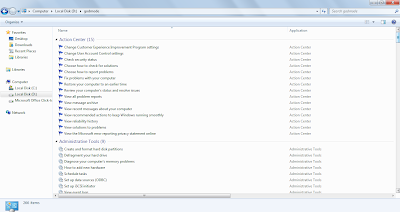
Screenshot of Godmode Folder in Windows 7
GCWYCUSNUWT6
1: Go to C or D or any drive
2: Right click.
3: Click create folder.
4: Rename your new folder with , Click here for Folder Name
and press enter.
5: Blink as the folder changes form to look like the control panel.
6: Open the folder and the treasure of Settings is yours.
Cheers!!!

Screenshot of Godmode Folder in Windows 7
GCWYCUSNUWT6
